Ghostavix

Every app for £5

Questions? hello@ghostavix.co.uk

Help

Downloads

Get Ghostavix.

Ghost Hub for your Android phone and Ghost Setup for your Windows PC. Both are free to download.

Android

Ghost Hub

The store for Ghost apps. It installs them, checks every download and keeps them up to date. Free to download; the apps inside need a Paid key.

Android 8.0 or newer · Not available for iPhone


Version
Latest
Size
About 5 MB
Released
Recently
Needs
Android 8.0 or newer, phone or tablet
File
GhostHub-latest.apk
SHA-256
Shown once the page has loaded
Signed by
67:96:B7:1C:98:82:B3:20:BC:9F:57:75:07:A2:1C:76:35:FE:A7:8C:A5:C5:C9:BC:FE:39:08:8A:B0:B1:11:FE
Every Ghost app has this signing certificate. Android won't let an app with a different one update it.

Installing on your phone

  1. Download

    Tap Download Ghost Hub on your Android phone, then open the file when it's done.

  2. Allow installs

    Android asks to allow installs from your browser: tap Settings, switch on Allow, then go back and tap Install.

  3. Add your key

    Open Ghost Hub, type your key in, and install the apps you want.

Android only. Ghost Hub and the Ghost apps don't work on iPhone or iPad. Ghost GPS for iPhone is a separate app, coming soon.

The apps

Installed from inside Ghost Hub.

The apps themselves are downloaded by Ghost Hub, only for keys that include them. These are the latest versions.

AppLatest versionGet it
Ghost Browser…Ghost Hub, with a Paid key
Ghost VPN…Ghost Hub, with a Paid key
Ghost Weather…Ghost Hub, with a Paid key
Ghost Volume…Ghost Hub, with a Paid key
Ghost GPS…Ghost Hub, with a Paid key
Ghost Terminal…Ghost Hub, with a Paid key

Windows · Free

Ghost Setup

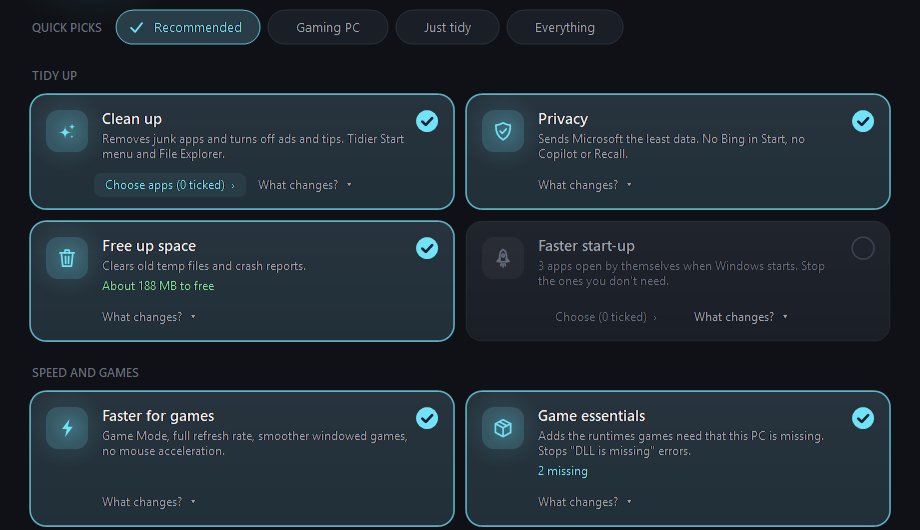
Tunes up your PC in one go: clears out junk apps and ads, speeds up games and your connection, updates drivers and gives Windows a clean Ghost look. A menu down the side takes you to Apps, Speed, Network, Privacy, Clean up, Look, Drivers and Tools, and there is a Search page. It updates itself. Free, no account or key needed.

Windows may show "Windows protected your PC" because the app is new. Click More info, then Run anyway. It asks for admin because it changes Windows settings. Some antivirus tools flag new programs they haven't seen before; here's why, and what to do. See everything it changes before you run it.


Version
2.0.0
Size
10.1 MB
Needs
Windows 10 or 11, and an administrator account
File
GhostSetup.exe
SHA-256
7e2cb5f0144207158f5d7e1e65cfec8deea40bcb4748802c13916586b569d507
Updates
It looks for a newer version when it opens (you can switch that off in Settings) and checks each download against its SHA-256 before using it
Undo
It makes a restore point first, so System Restore can undo its settings

Ghost Setup's home page: a menu down the left with Home, Search, Apps, Speed, Network, Privacy, Clean up, Look, Drivers, Tools and Settings, quick picks, and a card for each page