Ghost Browser
Private browsing
Blocks ads and trackers, and sites forget you when you leave.
- Translate pages, automatically if you like
- Dark mode for every website
- Reading list with offline copies
- QR scanner, incognito tabs, read aloud
Products
Eight Android apps, the Ghost Hub store that installs them, and Ghost Setup for Windows. One Paid key unlocks every Android app, for good.
Keys
A Paid key is a lifetime licence for every Ghost app on one Android phone. A Free key is free, for 48 hours at a time.
£5 one time
A lifetime licence for all eight Ghost apps.
You need a free account to buy. By buying you agree to the Terms of sale and the Licence agreement. See Refunds and cancellations.
48 hours
Do a quick set of ads and get the Free apps for 48 hours.
You need a free account. See Free keys in the Terms.
These are free for everyone.
Android only. The Paid and Free keys are for Android: Ghost apps don't work on iPhone or iPad, and these keys can't be used on them. Please check you have an Android phone or tablet (Android 8.0 or newer) before you buy. (Ghost GPS for iPhone, below, has its own key.)
| Price | £5, paid once. Nothing is added at checkout. |
|---|---|
| What it unlocks | Ghost Browser, Ghost VPN, Ghost Weather, Ghost Volume, Ghost GPS, Ghost Terminal, Ghost Alarm and Ghost Music, plus any new app offered to Paid keys |
| How long | For as long as Ghostavix runs the apps, with every update included |
| Devices | One Android phone or tablet: the first one that enters the key. Changing phones? We'll move it for you. |
| Delivery | Your key appears in your account and is emailed to you once your payment is confirmed: minutes for crypto, usually a day or two for bank transfers |
| Payment | Bitcoin (BTC), Solana (SOL) or UK bank transfer |
| Cancelling | You can cancel an order any time before your key is sent. Once it's sent, the 14-day right to cancel no longer applies, but faulty or missing keys are always put right. Full details |
| Licence terms | Licence agreement · Terms of sale |
iPhone
Set your iPhone's location to anywhere in the world. It has its own iPhone key: buy time, and add more whenever you like.
Coming soon: it's being tested now. You'll plug your iPhone into a Windows PC or Mac and use a free computer app.
Android apps
Built for Android, simple to use, and free of ads. All eight come with a Paid key.
Private browsing
Blocks ads and trackers, and sites forget you when you leave.

One-tap VPN
Connect through free volunteer servers in lots of countries.

Live weather
Where you are and anywhere you save, with rain at a glance.

Volume for every app
Each app gets its own volume, switched when you open it.

Location, anywhere
Set your phone's location to anywhere in the world, for testing apps and trying places out.

A shell in your pocket
A command line on your phone, for exploring how Android works.

Alarms you can't sleep through
To turn it off, do a quick task first: sums, shaking the phone, typing a sentence or a memory game.

Your songs, your sound
Plays the music saved on your phone, with an equaliser that remembers each pair of headphones.
At a glance
| Product | Runs on | Price | Needs |
|---|---|---|---|
 Ghost Hub | Android 8.0+ | Free | Nothing |
| Ghost Browser | Android 8.0+ | Paid key | Ghost Hub |
| Ghost VPN | Android 8.0+ | Paid key | Ghost Hub, and the free OpenVPN for Android app |
| Ghost Weather | Android 8.0+ | Paid key | Ghost Hub |
| Ghost Volume | Android 8.0+ | Paid key | Ghost Hub |
| Ghost GPS | Android 8.0+ | Paid key | Ghost Hub, and Developer options switched on |
| Ghost Terminal | Android 8.0+ | Paid key | Ghost Hub |
| Ghost Alarm | Android 8.0+ | Paid key | Ghost Hub |
| Ghost Music | Android 8.0+ | Paid key | Ghost Hub, and music saved on the phone |
 Ghost Setup | Windows 10 or 11 | Free | An administrator account on the PC |
Ghost Hub · Free
Ghost Hub installs Ghost apps, checks each download's fingerprint before it installs, and updates everything with one tap. Your key lives here, and the other apps check with it on your phone.
Ghost Setup for Windows · Free
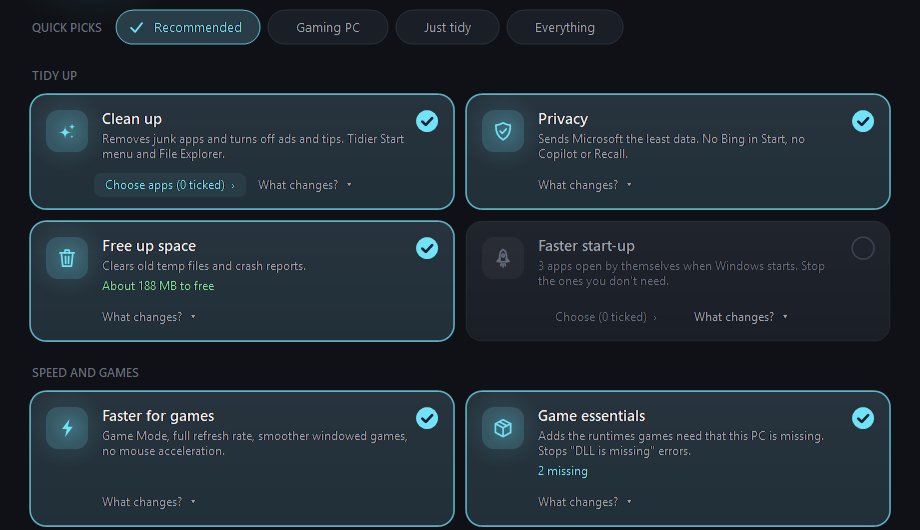
It clears out junk apps and ads, speeds up games and your connection, gets your drivers up to date and gives Windows a clean, dark Ghost look. A menu down the side has a page for each: Apps, Speed, Network, Privacy, Clean up, Look, Drivers and Tools, and a Search page finds any setting. Pick what you want, then press Start.